
Anatomy of a Native Feeling HTML5 iOS App
There’s been a lot of bad press about how you can’t build a native feeling HTML5 app on iOS. The main (perceived) issue is that HTML5 apps don’t “feel” native as you click around. However, I’m of the opinion that you can build beautiful native-feeling apps with HTML5, but it requires attention to detail. The trick is to test and optimize every UI interaction on the device as you build out the app. If something “feels” laggy, then stop building until you get it to feel native, by hook or by crook.
I’ve been touting this possibility to a number of clients over the past year, however they’ve all been too risk averse and chose to go native… until now. Thankfully, UberMedia let me have a stab at building a small app for them in pure HTML5. The app is called Splitsville (a check-splitting app), it’s available on the app store for you to check out. So far, most people who use it think it “feels” native.
Honestly, entire categories have been doing this for years out of pure necessity. Crypto betting sites are the obvious example — Apple and Google’s store policies effectively push them onto the mobile web, so the operators in that space have poured serious engineering into making HTML5 feel indistinguishable from native, right down to tap response and scroll inertia. If teams working under those constraints can hit that bar, there’s no real excuse for the rest of us — including a check-splitting app — to settle for laggy.
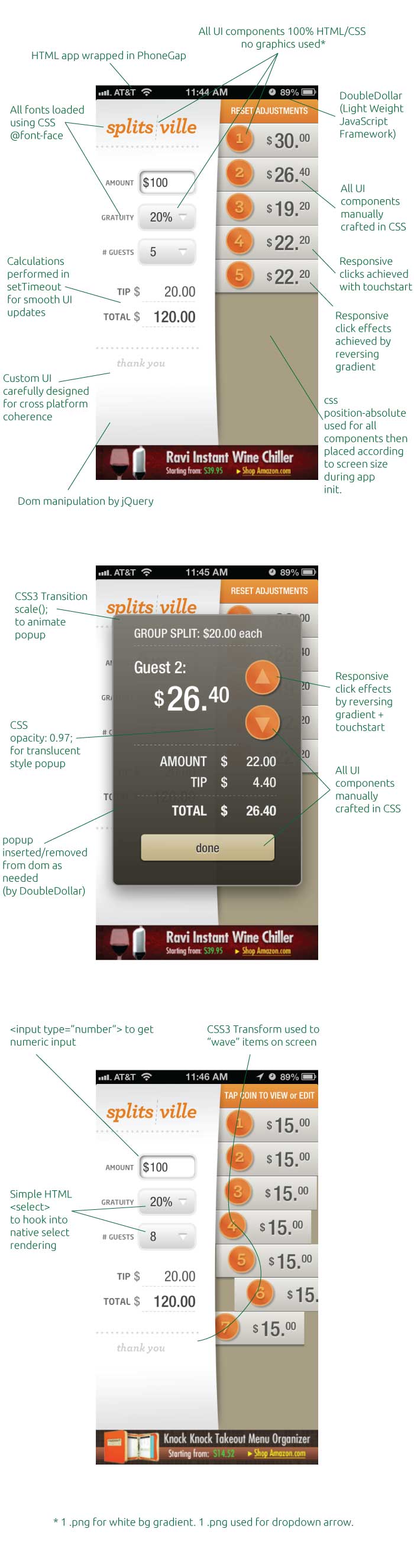
Although the app is small, it’s easy to imagine that a larger app made of multiple components such as this could also be made to feel just as native.